GitHub Copilot — Introduction
🤖 GitHub Copilot — Your AI-Powered Coding Assistant
Section titled “🤖 GitHub Copilot — Your AI-Powered Coding Assistant”GitHub Copilot is an AI-powered pair programmer developed by GitHub and OpenAI.
It helps developers write code faster, smarter, and with greater confidence by suggesting full lines, functions, tests, and even documentation — all context-aware and adaptable to your project’s patterns.
🚀 What Is GitHub Copilot?
Section titled “🚀 What Is GitHub Copilot?”- Provides context-aware code suggestions directly as you type
- Generates code from natural-language comments
- Explains or refactors code through Copilot Chat
- Learns and adapts to your team’s conventions
- Keeps you in control — every suggestion is reviewable before acceptance
✨ Key Features
Section titled “✨ Key Features”🔹 1. Inline Code Completions
Section titled “🔹 1. Inline Code Completions”- Accept with Tab and cycle alternatives with your keymap
- Supports idiomatic patterns across JavaScript / TypeScript / Python / C# / Java / Go / and more
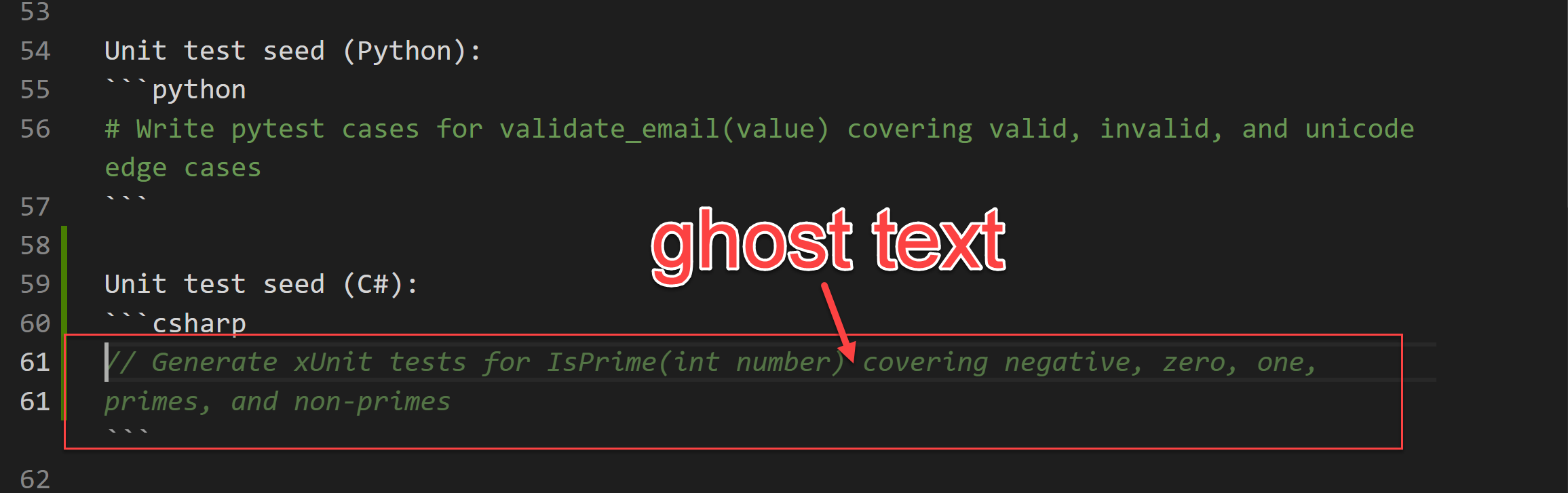
Example — Ghost Text Suggestion:
🔹 2. Copilot Chat
Section titled “🔹 2. Copilot Chat”- Ask Copilot to explain code, generate tests, fix bugs, or modernize APIs
- Works within IDE and PR views
- Example: “Explain how this function handles edge cases and propose three additional tests.”
🔹 3. IDE & GitHub Integration
Section titled “🔹 3. IDE & GitHub Integration”- VS Code (Windows/macOS/Linux)
- JetBrains IDEs (IntelliJ, PyCharm, WebStorm, Rider)
- Visual Studio 2022 (selected languages)
- Neovim (via community plugin)
- GitHub.com UI – PR summaries, inline review suggestions
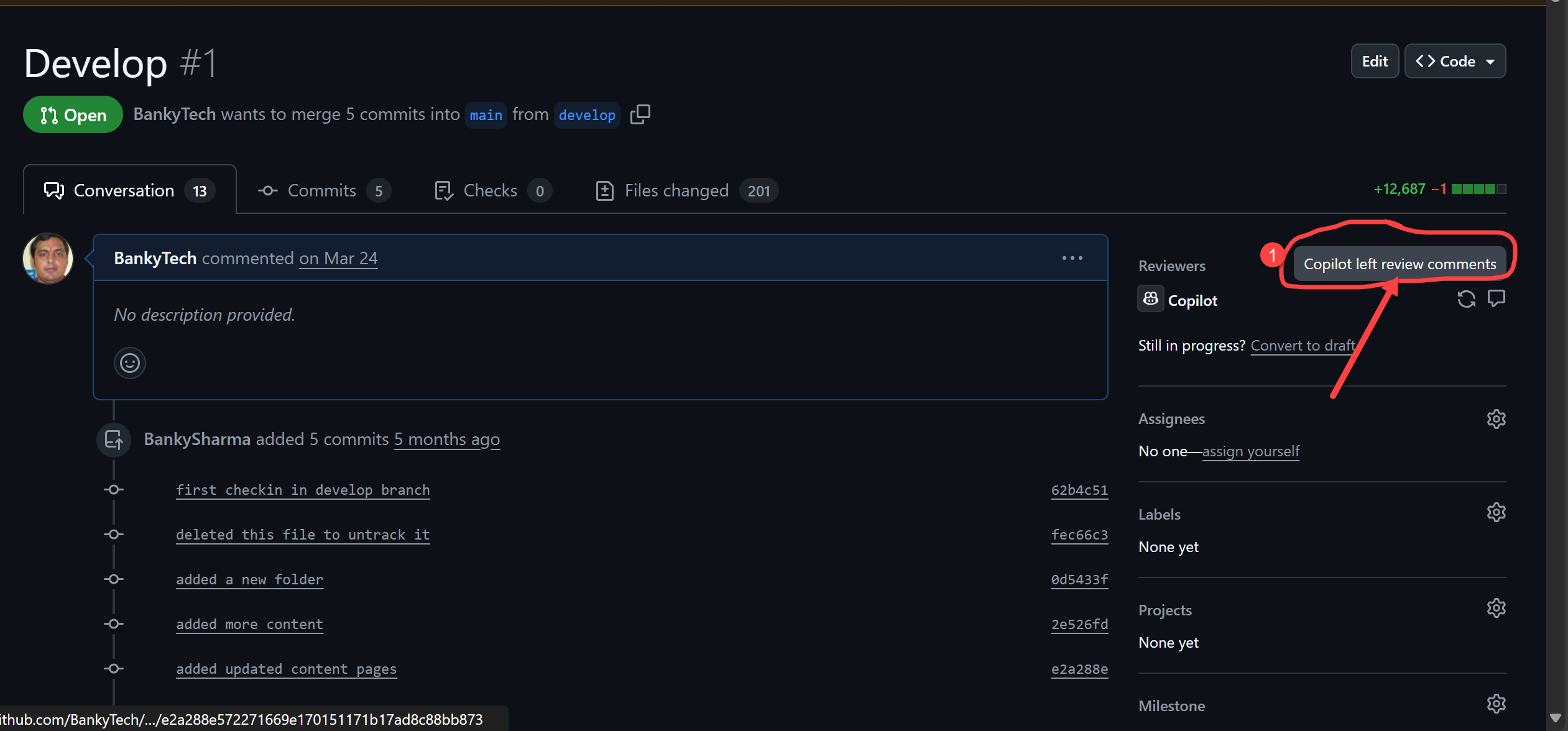
➡️ Example: Requesting code reviews directly from your browser on GitHub.com

Once Copilot adds review comments:
Individual comments:


🔹 4. Documentation & Explanation
Section titled “🔹 4. Documentation & Explanation”- Generates docstrings, README sections, and inline comments
- Explains unfamiliar frameworks or API usage in plain language
🔹 5. Debugging & Refactoring
Section titled “🔹 5. Debugging & Refactoring”- Suggests fixes for syntax or logic errors
- Modernizes callbacks → async/await, adds input validation, optimizes loops
🧩 How GitHub Copilot Works
Section titled “🧩 How GitHub Copilot Works”- Install the GitHub Copilot extension in your IDE.
- Start typing code or natural-language comments.
- Review suggestions and accept, modify, or reject them.
- Use Copilot Chat to refactor, debug, and generate tests or docs.
💡 Usage Guidance
Section titled “💡 Usage Guidance”- Provide contextual comments to improve suggestion quality.
- Always review AI-generated code for correctness, security, and style.
- Combine Copilot with tests, linters, and code reviews for robust delivery.
💰 Pricing Plans
Section titled “💰 Pricing Plans”| Plan | Details | Price |
|---|---|---|
| Free | For verified students, teachers, and open-source maintainers | $0 |
| Individual | Personal subscription for developers | $10 / month or $100 / year |
| Business | Org-level plan with admin controls & policy settings | $19 / user / month |
⚖️ Copilot vs Other AI Coding Assistants
Section titled “⚖️ Copilot vs Other AI Coding Assistants”| Feature | GitHub Copilot | Tabnine | Codeium | Microsoft Copilot |
|---|---|---|---|---|
| AI Model | Multi-vendor picker (OpenAI, Anthropic, Google) | Proprietary AI | Proprietary AI | Mix of OpenAI GPT-5.x and Microsoft’s in-house MAI models |
| Best For | Multi-language code generation and IDE integration | Code completions | Open-source AI coding | Microsoft 365 apps |
| Pricing | Starts at $10 / month | Free & Paid Plans | Free | Business Pricing |
📘 Quick Examples
Section titled “📘 Quick Examples”🧠 Comment → Code (JavaScript)
Section titled “🧠 Comment → Code (JavaScript)”// parse query string into an object; decode keys/values; ignore empty pairsfunction parseQuery(qs) { // ...}💬 Chat Prompt
Section titled “💬 Chat Prompt”Explain how this function handles edge cases and propose three additional tests.🧪 Unit Test Seed (Python)
Section titled “🧪 Unit Test Seed (Python)”# Write pytest cases for validate_email(value) covering valid, invalid, and unicode edge cases🧭 Final Thoughts
Section titled “🧭 Final Thoughts”GitHub Copilot is a game-changer for developers, transforming the way we code.
Whether you’re a beginner learning syntax or an architect building enterprise solutions,
Copilot helps you focus on logic, not boilerplate, making development faster and more enjoyable.
🚀 Try GitHub Copilot today and experience AI-assisted coding like never before!